> ## Documentation Index
> Fetch the complete documentation index at: https://penseapp.vercel.app/docs/llms.txt
> Use this file to discover all available pages before exploring further.
# Simulations
> Run simulated conversations to test your agent end-to-end
## Set up your agent
There are two ways to run simulations:
Define your agent completely within Calibrate
Connect your existing text or voice agent
***
## Personas
An array of user personas that simulate different types of users interacting with your agent. For a primer on personas, refer to [Personas](/docs/core-concepts/personas). Each persona has:
| Key | Type | Description |
| -------------------------- | ------ | ---------------------------------------------------------------------------------------------------------------------------------- |
| `label` | string | A short name for the persona |
| `characteristics` | string | Detailed description of **who** the persona represents and **how** they behave |
| `gender` | string | Gender for voice simulations: `male` or `female` |
| `language` | string | Language the persona speaks: `english`, `hindi`, or `kannada` (more coming soon) |
| `interruption_sensitivity` | string | (Voice only) How likely the persona is to interrupt the agent mid-sentence: `none` (0%), `low` (25%), `medium` (50%), `high` (80%) |
```json theme={null}
{
"personas": [
{
"label": "friendly customer",
"characteristics": "You are a friendly customer who wants to check your order status. Your order ID is ORD-12345. You are polite and patient.",
"gender": "neutral",
"language": "english"
},
{
"label": "impatient customer",
"characteristics": "You are an impatient customer who has been waiting a long time for your order. Your order ID is ORD-67890. You are frustrated but not rude.",
"gender": "neutral",
"language": "english"
}
]
}
```
## Scenarios
An array of scenarios that define different conversation patterns to test. For a primer on scenarios, refer to [Scenarios](/docs/core-concepts/scenarios). Each scenario has:
| Key | Type | Description |
| ------------- | ------ | ------------------------------------------------------ |
| `name` | string | A short name for the scenario |
| `description` | string | Instructions for **what** the simulated user should do |
```json theme={null}
{
"scenarios": [
{
"name": "simple order inquiry",
"description": "Ask about your order status directly and provide your order ID right away."
},
{
"name": "vague inquiry",
"description": "Start by asking about your order without providing the order ID. Only provide it after being asked."
}
]
}
```
## Evaluators
An array of LLM judges used to evaluate the agent's performance. Each evaluator becomes its own LLM call per simulation — all evaluators run in parallel against the entire conversation transcript.
You must define every evaluator yourself, including all of the context that the judge needs in its `system_prompt`.
You can also set the **`judge_model`** on an evaluator to use a different model. The default judge model is `openai/gpt-5.4-mini`.
| Key | Type | Description |
| --------------- | ------- | ---------------------------------------------------------------------------------------------------------------------------------- |
| `id` | string | Optional unique id. Result rows echo it as `evaluator_id`; output `config.json` includes raw `evaluators` and an `evaluators_map`. |
| `name` | string | A short name (used in results and leaderboard columns) |
| `system_prompt` | string | Full system prompt for this evaluator's LLM judge call. Include any agent-context the judge needs to score correctly. |
| `judge_model` | string | OpenRouter model id for this evaluator (default: `openai/gpt-5.4-mini`) |
| `type` | string | `"binary"` (default) or `"rating"` |
| `scale_min` | integer | Required when `type` is `"rating"`. Lowest allowed score. |
| `scale_max` | integer | Required when `type` is `"rating"`. Highest allowed score. |
```json theme={null}
{
"evaluators": [
{
"id": "tool-usage-id",
"name": "tool_usage",
"system_prompt": "You are a highly accurate evaluator assessing a conversation between an agent (a customer support assistant for an online store) and a simulated user. You will be given the chat history of the conversation. Mark True if the agent called the `log_inquiry` tool with the correct `inquiry_type` and `order_id` whenever the customer provided one.",
"judge_model": "openai/gpt-5.4-mini"
},
{
"id": "helpfulness-id",
"name": "helpfulness",
"system_prompt": "You are a highly accurate evaluator assessing a conversation between a customer support agent and a simulated user. You will be given the chat history of the conversation. Rate the agent's helpfulness on a 1-5 scale: 1 (unhelpful, confused), 3 (somewhat helpful), 5 (clearly resolved the customer's need).",
"judge_model": "openai/gpt-5.4-mini",
"type": "rating",
"scale_min": 1,
"scale_max": 5
},
{
"id": "goal-completion-id",
"name": "goal_completion",
"system_prompt": "You are a highly accurate evaluator.\n\nYou will be given a conversation between a user and an agent. Evaluate whether the agent successfully helped the user achieve their goal by the end of the conversation.\n\nEvaluation criteria:\n- The user's primary goal or request must be fully addressed.\n- Partial completion or unresolved follow-ups count as not completed.\n- If the user's goal is unclear, judge based on whether the agent made reasonable progress toward what was asked.\n\nMark True if the goal was fully achieved; False otherwise.\n\nAlways give your reasoning in english irrespective of the language of the conversation."
},
{
"id": "empathy-tone-id",
"name": "empathy_tone",
"system_prompt": "You are a highly accurate evaluator.\n\nYou will be given a conversation between a user and an agent. Rate how empathetic and appropriate the agent's tone was throughout the conversation.\n\nEvaluation criteria:\n- Did the agent acknowledge the user's emotions or concerns?\n- Was the tone polite, respectful, and contextually appropriate?\n- Did the agent avoid being dismissive, condescending, or curt?\n\nRespond with an integer score from 1 to 5, where:\n1 = rude, distant, dismissive, or hostile\n2 = cold or unhelpful\n3 = neutral — acceptable but not warm\n4 = friendly and considerate\n5 = consistently highly empathetic and emotionally aware\n\nAlways give your reasoning in english irrespective of the language of the conversation.",
"type": "rating",
"scale_min": 1,
"scale_max": 5
},
{
"id": "persona-adherence-id",
"name": "persona_adherence",
"system_prompt": "You are a highly accurate evaluator.\n\nYou will be given a conversation between a user and an agent that has been assigned a specific role or persona. Evaluate whether the agent stayed consistently in role throughout the conversation.\n\nEvaluation criteria:\n- The agent should not break character or reveal that it is an AI/LLM unless explicitly asked.\n- The agent should consistently behave in line with its assigned role, scope, and tone.\n- Acknowledging limitations within the role is fine; explicitly stepping outside the role is not.\n\nMark True if the agent stayed in role throughout; False otherwise.\n\nAlways give your reasoning in english irrespective of the language of the conversation."
}
]
}
```
Paste the `evaluators` array next to `system_prompt`, `personas`, `scenarios`, and your other top-level keys in your simulation config JSON.
Binary evaluators produce pass/fail and appear as pass-rate percentages in the leaderboard. Rating evaluators produce an integer score on the scale you define and appear as mean scores in the leaderboard.
## Settings
Optional settings to control the simulation:
| Key | Type | Description |
| -------------------- | ------- | -------------------------------------------------------------------------------------------------------------------- |
| `agent_speaks_first` | boolean | Whether the agent initiates the conversation (default: `true`) |
| `max_turns` | number | Maximum number of agent turns after which the simulation ends automatically (default: `50` for text, `10` for voice) |
```json theme={null}
{
"settings": {
"agent_speaks_first": true,
"max_turns": 5
}
}
```
## STT, LLM, and TTS (voice simulations only)
For voice simulations, specify the STT, LLM, and TTS providers:
```json theme={null}
{
"stt": {
"provider": "google"
},
"tts": {
"provider": "google"
},
"llm": {
"provider": "openrouter",
"model": "openai/gpt-4.1"
}
}
```
## Full examples
See the [full text simulation file on GitHub](https://github.com/ARTPARK-SAHAI-ORG/calibrate/tree/main/examples/agent/simulation/sample_text_internal_agent.json) and the [full voice simulation file on GitHub](https://github.com/ARTPARK-SAHAI-ORG/calibrate/tree/main/examples/agent/simulation/sample_voice.json). The snippet below matches the **text** setup; voice runs add **`stt`**, **`tts`**, and **`llm`** (with **`model`**) and may set **`interruption_sensitivity`** on personas — see the voice sample for those keys.
```json theme={null}
{
"system_prompt": "You are a helpful customer support assistant...",
"tools": [...],
"personas": [
{
"label": "friendly customer",
"characteristics": "You are a friendly customer who wants to check your order status. Your order ID is ORD-12345. You are polite and patient.",
"gender": "neutral",
"language": "english"
}
],
"scenarios": [
{
"name": "simple order inquiry",
"description": "Ask about your order status directly and provide your order ID right away."
}
],
"evaluators": [
{
"id": "tool-usage-id",
"name": "tool_usage",
"system_prompt": "You are a highly accurate evaluator assessing a conversation between an agent (a customer support assistant for an online store) and a simulated user. You will be given the chat history of the conversation. Mark True if the agent called the `log_inquiry` tool with the correct `inquiry_type` and `order_id` whenever the customer provided one.",
"judge_model": "openai/gpt-5.4-mini"
}
],
"settings": {
"agent_speaks_first": true,
"max_turns": 5
}
}
```
```json theme={null}
{
"stt": { "provider": "sarvam" },
"tts": { "provider": "cartesia" },
"llm": { "model": "google/gemini-3-flash-preview" }
}
```
See the [full file on GitHub](https://github.com/ARTPARK-SAHAI-ORG/calibrate/tree/main/examples/agent/simulation/sample_text_agent_connection.json).
Refer to [Agent Connections → Chat agent](/docs/cli/agent-connections/chat) for the full reference.
```json theme={null}
{
"agent_url": "https://your-agent.com/chat",
"agent_headers": {
"Authorization": "Bearer YOUR_API_KEY"
},
"personas": [
{
"label": "friendly customer",
"characteristics": "You are a friendly customer who wants to check your order status. Your order ID is ORD-12345. You are polite and patient.",
"gender": "neutral",
"language": "english"
}
],
"scenarios": [
{
"name": "simple order inquiry",
"description": "Ask about your order status directly and provide your order ID right away."
}
],
"evaluators": [
{
"id": "order-resolved-id",
"name": "order_resolved",
"system_prompt": "You are a highly accurate evaluator assessing a conversation between a customer support agent and a simulated user. You will be given the chat history of the conversation. Mark True if the agent looked up and clearly communicated the order status to the customer.",
"judge_model": "openai/gpt-4.1"
}
],
"settings": {
"agent_speaks_first": true,
"max_turns": 5
}
}
```
See the [full file on GitHub](https://github.com/ARTPARK-SAHAI-ORG/calibrate/tree/main/examples/agent/simulation/sample_voice_agent_connection.json).
Refer to [Agent Connections → Outbound voice agent](/docs/cli/agent-connections/outbound-voice) for the full reference.
```json theme={null}
{
"agent_url": "ws://localhost:8765",
"personas": [
{
"label": "friendly customer",
"characteristics": "You are a friendly customer who wants to check your order status. Your order ID is ORD-12345. You are polite and patient.",
"gender": "neutral",
"language": "english"
}
],
"scenarios": [
{
"name": "simple order inquiry",
"description": "Ask about your order status directly and provide your order ID right away."
}
],
"evaluators": [
{
"id": "order-resolved-id",
"name": "order_resolved",
"system_prompt": "You are a highly accurate evaluator assessing a conversation between a customer support agent and a simulated user. You will be given the chat history of the conversation. Mark True if the agent looked up and clearly communicated the order status to the customer.",
"judge_model": "openai/gpt-4.1"
}
],
"settings": {
"agent_speaks_first": true,
"max_turns": 5
}
}
```
## Get started
### Interactive mode
Run `calibrate-agent simulations` with no arguments to launch the interactive UI:
```bash theme={null}
calibrate-agent simulations
```
**Calibrate agent (text):**
1. **Simulation type** — select "Text"
2. **Config file** — path to your config file
3. **Provider** — OpenRouter or OpenAI
4. **Model** — the model used for both the agent and user simulator
5. **Parallel count** — how many simulations to run simultaneously (default: `1`)
6. **Output directory** — where results will be saved (defaults to `./out`)
7. **API keys** — enter the API keys for the selected provider
**Calibrate agent (voice):**
1. **Simulation type** — select "Voice"
2. **Config file** — path to your config file (with `stt`, `tts`, and `llm` set)
3. **Parallel count** — how many simulations to run simultaneously (default: `1`)
4. **Output directory** — where results will be saved (defaults to `./out`)
5. **API keys** — enter the API keys for the selected providers
**Agent connection (text & voice):**
1. **Simulation type** — select `Text` or `Voice`
2. **Config file** — path to your config file
3. **Parallel count** — how many simulations to run simultaneously (default: `1`)
4. **Output directory** — where results will be saved (defaults to `./out`)
5. **API keys** — only `OPENAI_API_KEY` is required (used by the user simulator and LLM judge)
### Non-interactive mode
Pass `--type text` or `--type voice` and a config file directly to skip the UI.
**Calibrate agent (text):**
```bash theme={null}
calibrate-agent simulations --type text -c config.json -m openai/gpt-4.1 -p openrouter -o ./out
```
**Calibrate agent (voice):**
```bash theme={null}
calibrate-agent simulations --type voice -c config.json -o ./out
```
**Chat agent (text):**
```bash theme={null}
calibrate-agent simulations --type text -c config.json -o ./out
```
**Outbound voice agent (voice):**
```bash theme={null}
calibrate-agent simulations --type voice -c config.json -o ./out
```
Run multiple simulations in parallel with `-n`:
```bash theme={null}
calibrate-agent simulations --type text -c config.json -o ./out -n 2
```
You can also set the default parallelism with the
`CALIBRATE_SIMULATION_PARALLEL` environment variable (defaults to `1`). The
`-n`/`--parallel` flag takes precedence over it when provided.
Simulations run for every persona × scenario combination. For example, 2 personas × 2 scenarios = 4 simulations.
**Skip verification:**
For agent connection configs, calibrate verifies the connection before running. Pass `--skip-verify` to skip this step — useful in CI/automation pipelines where you've already confirmed the agent is reachable:
```bash theme={null}
calibrate-agent simulations --type text -c config.json -o ./out --skip-verify
```
## Output
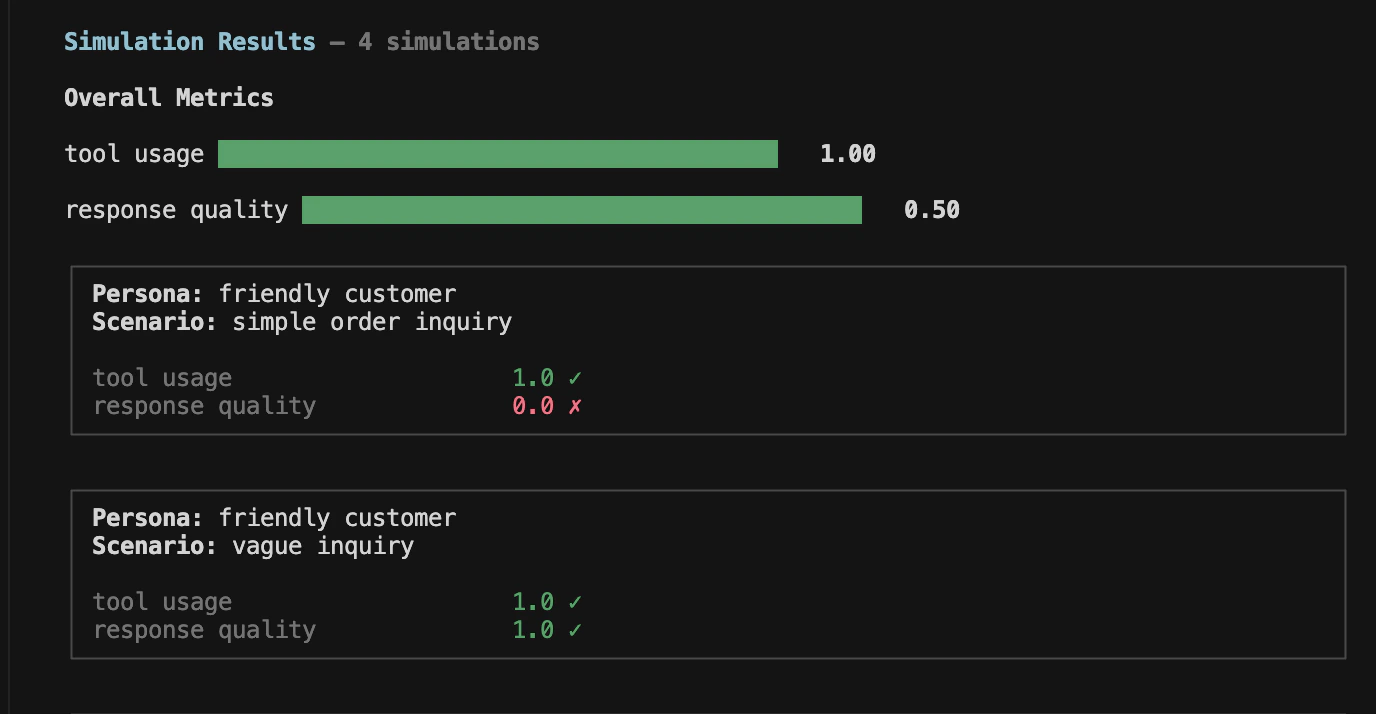
Once all simulated conversations complete, it displays the overall metrics aggregated across all simulations along with bar charts for visualization.
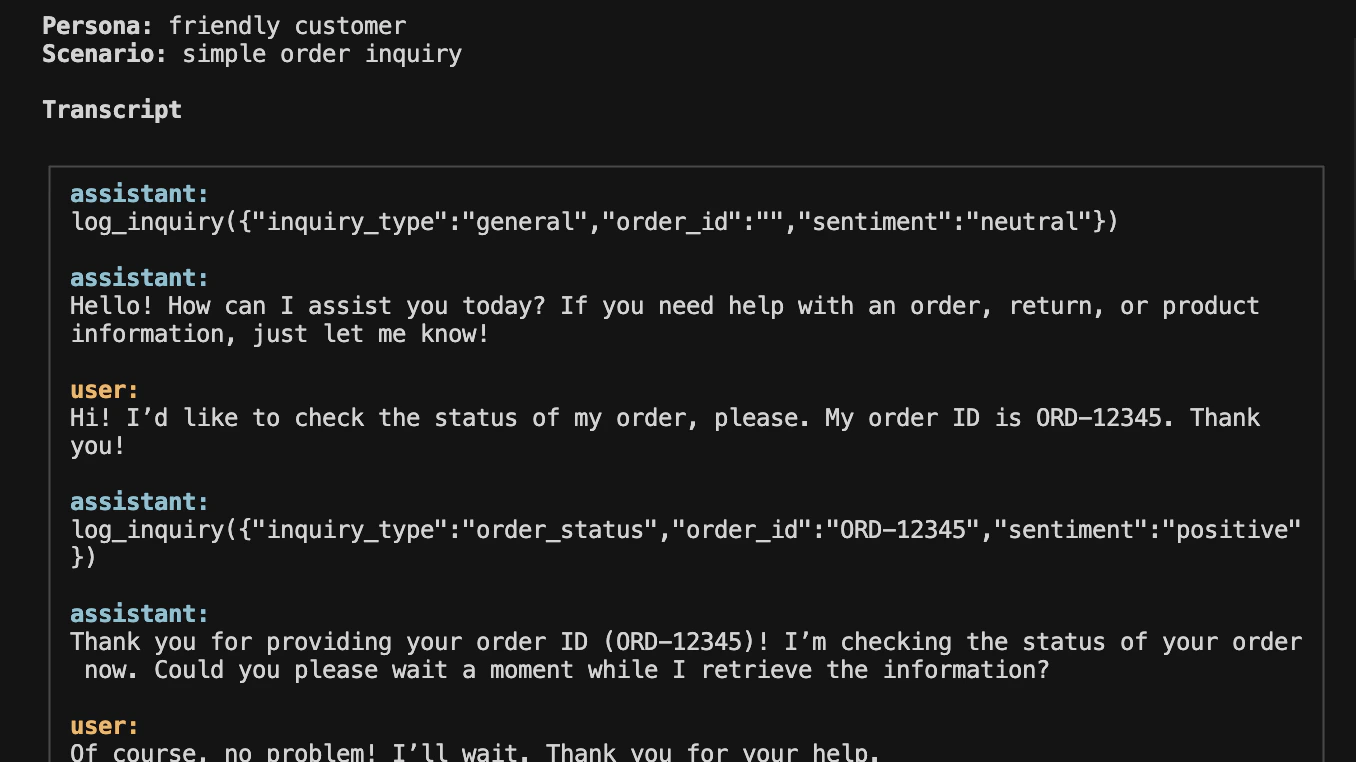
You can drill into each simulation to view the full transcript:
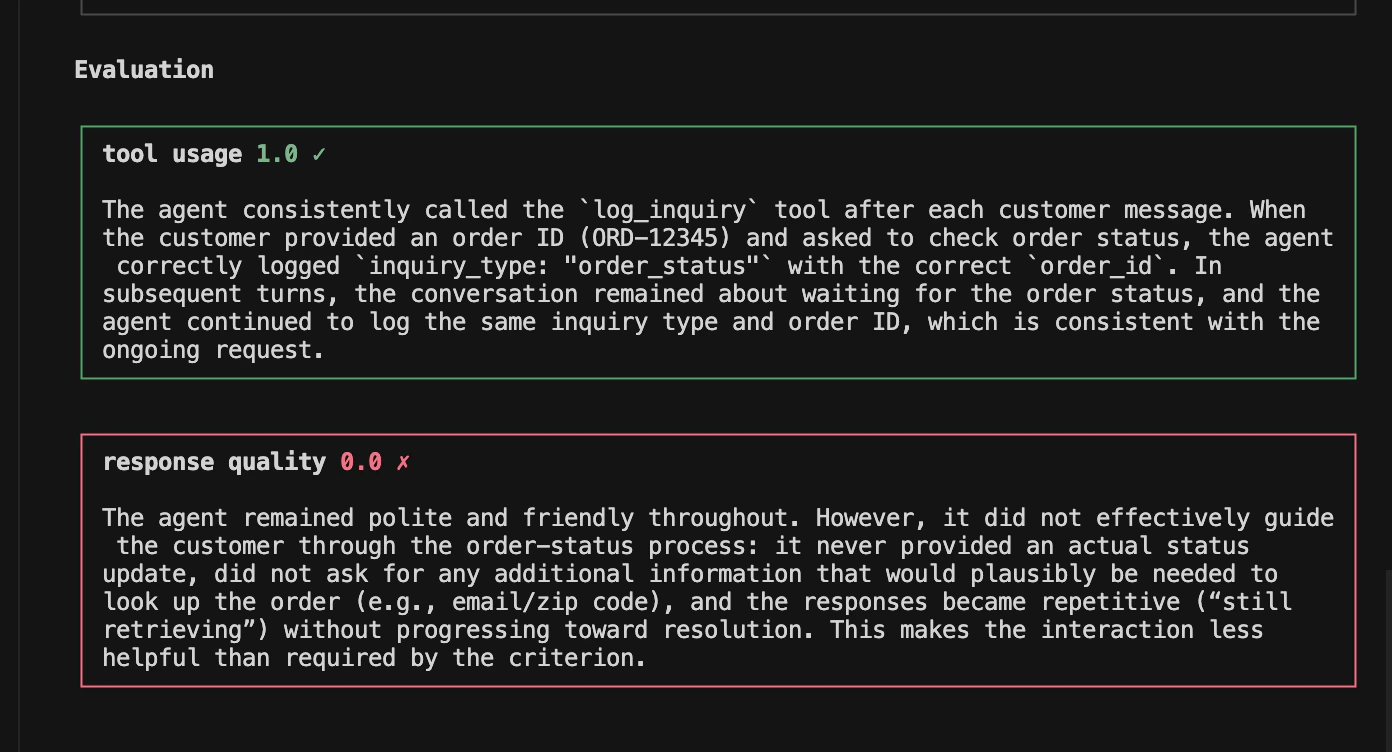
and review the reasoning for each evaluation criterion:
## Resources
Learn how to create realistic user personas
Learn how to write effective scenarios
 You can drill into each simulation to view the full transcript:
 and review the reasoning for each evaluation criterion:
 ## Resources